MoniMata

Give every kobo a job.

Zero-based budgeting for Nigerians — Pidgin nudges, Interswitch bill payments, Mono bank sync, and offline-first storage.

See it in action

30-second demo walkthrough, followed by key app screens.
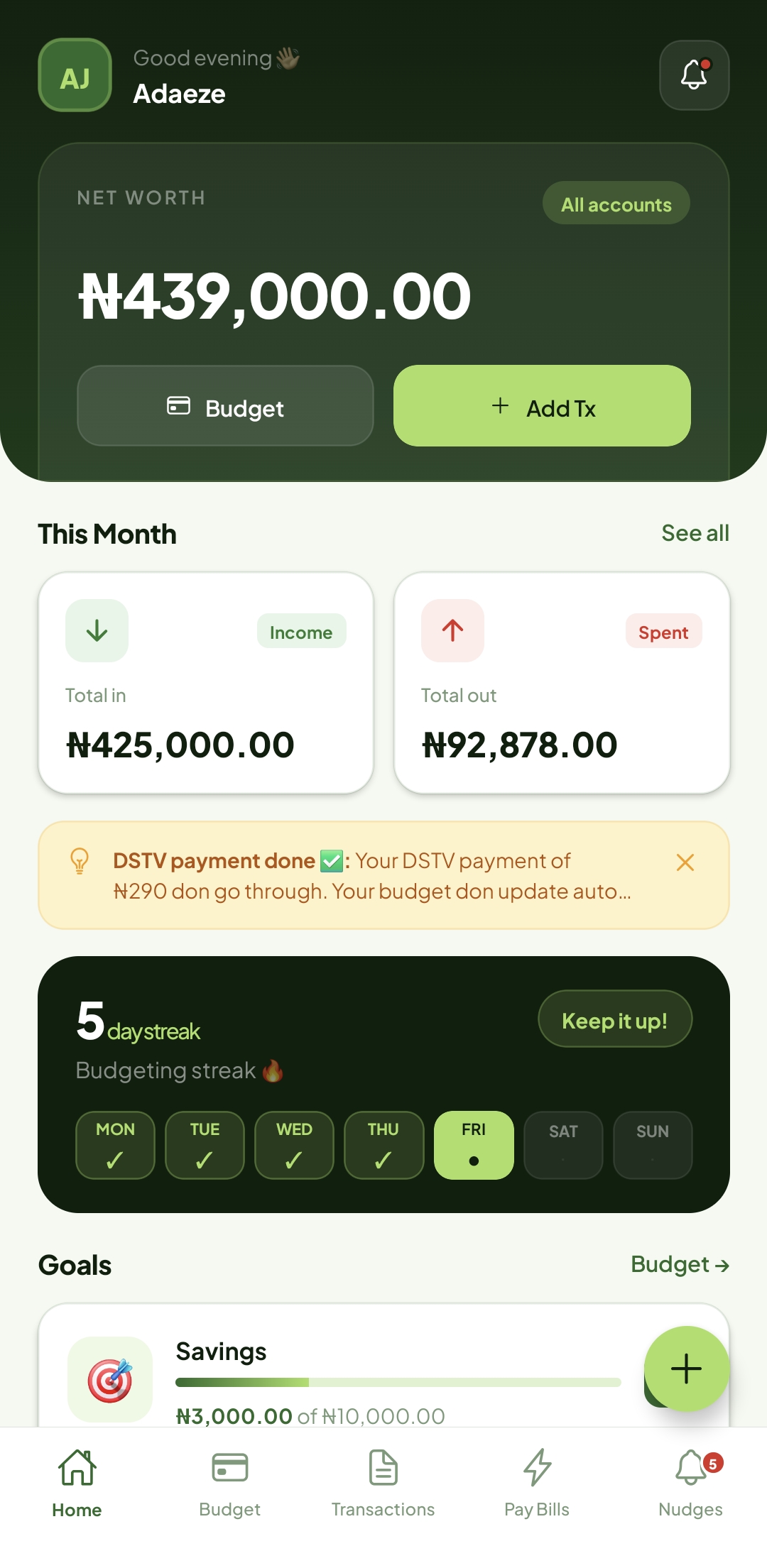
Home screen

Home — Ready to Assign

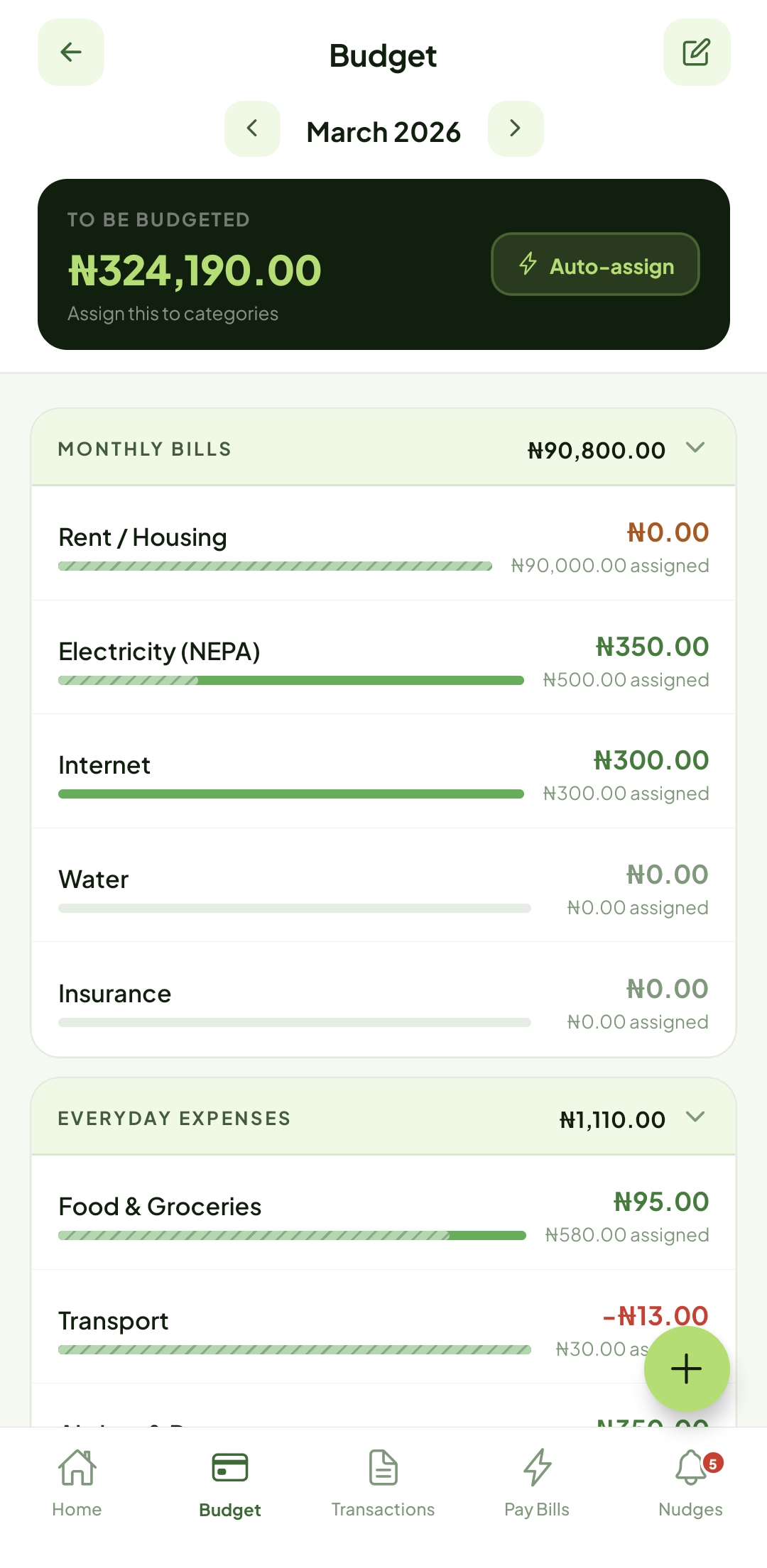
Budget tab

Budget — Give Kobo a Job

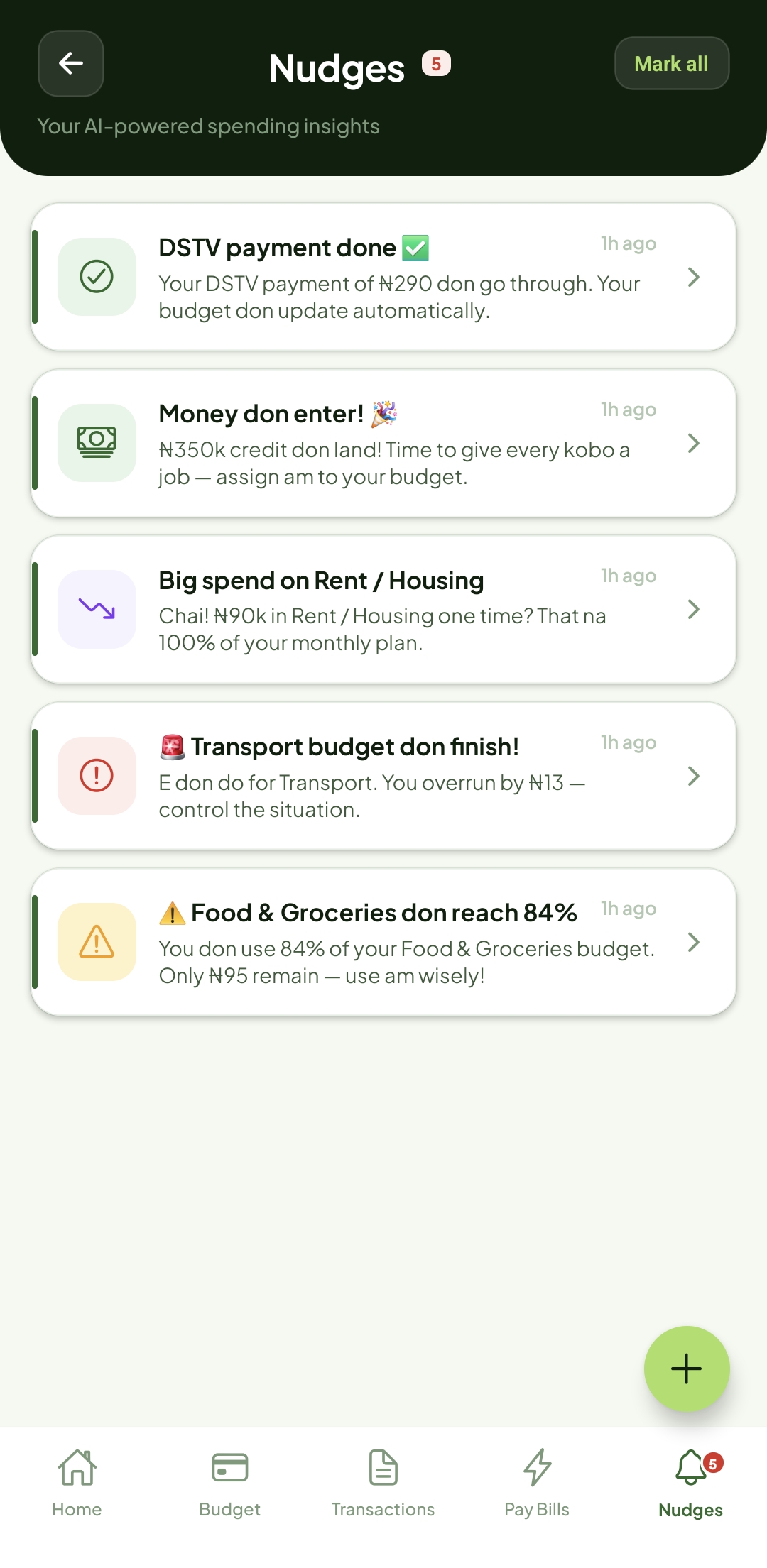
Nudges tab

Nudges — In Pidgin & English


Built for real Nigerian life

Every feature was designed around how Nigerians actually spend, save, and pay bills.

⚖️

Zero-Based Budgeting

Every kobo is assigned to a category. Income minus all assignments always equals zero — the TBB chip updates live as you type.

🪄

Auto-Assign (5 Strategies)

Distribute your TBB in one tap: Underfunded, Last Month Assigned, Last Month Spent, 3-Month Average Assigned, or 3-Month Average Spent. Live preview before applying.

🔔

Smart Nudges in Pidgin

Five trigger types — 80% threshold, 100% exceeded, large single transaction, money received, bill paid. Quiet hours, fatigue limits, Pidgin ↔ Formal toggle.

Bill Payments (Interswitch)

Pay DSTV, EKEDC, MTN, Glo, and 100+ billers via Interswitch Quickteller. 3-phase WebView checkout — customer validation → secure payment → live receipt.

🔁

Recurring Transactions

Schedule repeating debits and credits — daily, weekly, biweekly, monthly, or yearly. The server generates instances on each sync so you never miss a bill.

🎯

Savings Targets & Goals

Weekly, monthly, yearly, or custom (deadline) targets per category. Custom targets appear as goal progress cards on the Home screen. Cost to Be Me shows your monthly floor.

🏦

Mono Bank Sync

Link any Nigerian bank via Mono Connect. Auto-categorises imported transactions using a narration-mapping engine. Opening balance flows straight into TBB.

📴

Offline-First (WatermelonDB)

The full budget works without internet. WatermelonDB syncs in the background using a delta protocol — only changed records travel over the wire.

🔐

Biometric App Lock

Fingerprint / Face ID lock with configurable timeout. Multi-instance safe — toggling from settings immediately affects all open screens without a restart.

React Native (Expo) FastAPI WatermelonDB PostgreSQL Celery + Redis TanStack Query v5 Redux Toolkit Mono Connect Interswitch Quickteller Expo Router SQLAlchemy + Alembic WebSockets (live sync)

Try MoniMata now

No Play Store. No account needed to install. Sideload the APK directly onto any Android device.

Testing Guide

The demo account is pre-seeded with realistic Nigerian data — salary, rent, nudges already firing, goals in progress. Log in with the credentials below, then follow these steps.

🔑

Demo Credentials

Email test@test.com Password @bcd1234

1  Home Screen Tour

  • Dismiss the Welcome card — a 5-step spotlight tour starts.
  • Steps: Profile → Net Worth → All Accounts → This Month → Goals.
  • The Ready to Assign (TBB) chip shows your unassigned balance.
  • Goals shows Travel & Savings sinking funds with progress bars.

2  Budget Tab

  • Transport is red — 143% spent (over-budget).
  • Food & Groceries is orange — 84% spent.
  • Tap any amount → type to assign; TBB updates live.
  • Wand icon → pick strategy → preview → Apply.
  • Long-press a row to drag-reorder within its group.
  • Tap to set a target, hide, or rename a category.
  • "Cost to Be Me" card shows total monthly cost-of-living.

3  Targets

  • Budget ⋯ menu → Set Target.
  • 4 tabs: Weekly · Monthly · Yearly · Custom (deadline).
  • Custom targets appear as Goal cards on the Home screen.
  • Behaviors: Assign again · Refill up to · Maintain balance.
  • Save → Home Goals & Cost to Be Me update immediately.

4  Transactions

  • Full history with category chips — tap any row for detail view.
  • + → Add: amount, narration, debit/credit, account, category.
  • Tap Split to divide one transaction across multiple categories.
  • Recurring tab — 3 seeded rules (EKEDC, DSTV, Bolt). Pause / delete inline.
  • Toggle "Repeat this transaction" to create a new recurring rule.

5  Nudges Tab 🔔

  • Tab badge shows 5 unread nudges (pre-seeded).
  • Tap any nudge → Detail Sheet: "Why you got this" + action deep-links.
  • Swipe or tap Dismiss to remove. ✓✓ marks all read.
⚠️ Food & Groceries 84% threshold_80
🚨 Transport over budget threshold_100
Big spend on Rent large_single_tx
Money don enter 🎉 pay_received
DSTV payment done ✅ bill_payment

6  Bills (Interswitch) ⚡

  • Bills tab → browse categories.
  • Select TV/Cable → DStv → Compact Plus.
  • Enter any SmartCard number (sandbox), pick account + budget category.
  • Tap Pay → WebView checkout → 3-phase processing → receipt.
  • Subscriptions budget row updates automatically on completion.

7  Accounts

  • Home → All accounts → GTBank ₦354k + Kuda ₦85k.
  • + → add manual account with opening balance → TBB increases immediately.
  • Link Bank Account starts the Mono Connect flow.

8  Settings & Biometric Lock

  • Profile → Notification Settings: toggle nudges, Quiet Hours (23:00–07:00 WAT), fatigue limit, Pidgin / Formal.
  • Profile → Biometric Lock: toggle ON → fingerprint prompt. Background app 30 s → lock on return. Toggle OFF → immediate unlock.